
Download SCW EasyView Mobile – SCW Surveillance System, remote camera monitoring, live video streaming, video recording access, PTZ control, multi-camera view, NVR DVR access, mobile surveillance tool, secure camera access, SCW app
Overview
SCW EasyView Mobile is a dedicated companion application designed to extend the functionality of SCW-branded surveillance systems. The app enables users to remotely access live video feeds and recorded footage from their SCW cameras using a mobile device with an internet connection. It is specifically tailored for SCW hardware, ensuring seamless integration and optimized performance. This tool is ideal for homeowners, small business owners, and security personnel who require real-time monitoring of their premises from any location.
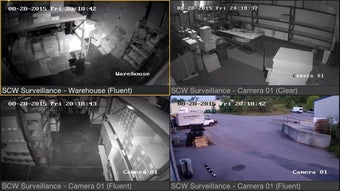
The application supports both audio and video streaming, which enhances situational awareness in critical scenarios such as home security, retail monitoring, or remote property oversight. Users can view up to four camera streams simultaneously, offering a comprehensive visual overview without switching between feeds. Additionally, the app allows direct control over Pan-Tilt-Zoom (PTZ) cameras, enabling precise adjustments to camera angles and zoom levels through intuitive touch gestures. For users managing multiple surveillance systems, the app supports access to several NVRs and DVRs from a single interface, streamlining centralized monitoring.
Initial setup may require configuring network settings, including opening specific ports on the router. However, SCW provides technical support to guide users through this process. The app is available at no cost, making it accessible to a wide range of users. Its focus on secure, reliable remote access positions it as a practical solution for those seeking dependable surveillance management on the go.
Key Features & Capabilities
- Remote Live Video Streaming – View real-time footage from SCW cameras anytime, anywhere, provided both the camera and mobile device have an active internet connection.
- Access to Recorded Footage – Retrieve and review video recordings stored on connected NVRs or DVRs directly from the mobile device.
- Multi-Stream Viewing – Monitor up to four camera feeds simultaneously, improving situational awareness during surveillance operations.
- PTZ Camera Control – Use touch-based controls to pan, tilt, and zoom cameras in real time, enabling dynamic monitoring of specific areas.
- Multi-NVR/DVR Access – Manage multiple surveillance systems from a single interface, ideal for users with distributed or complex setups.
- Audio and Video Monitoring – Capture both visual and audio data, useful in scenarios where verbal cues or ambient sounds are important.
- Secure Connection Protocol – Uses encrypted communication to protect data transmission between the app and surveillance system.
These capabilities make the app suitable for various real-world applications, including home security, retail store monitoring, construction site oversight, and remote property management. The ability to control PTZ cameras remotely allows users to investigate suspicious activity or adjust camera views based on changing conditions. Simultaneous multi-camera viewing helps reduce response time during emergencies by providing a broader field of view without requiring constant feed switching.
User Interface, Workflow & Performance
The user interface of SCW EasyView Mobile is designed with functionality and ease of navigation in mind. The main screen displays a grid layout for live or recorded streams, allowing users to quickly identify active cameras. Camera thumbnails are labeled with identifiers, and a simple tap activates full-screen viewing. The app uses a tab-based navigation system to switch between live view, playback, settings, and system status.
Workflow efficiency is enhanced by the ability to save favorite camera groups and create custom layouts for frequently monitored areas. The app maintains a consistent layout across different screen sizes, ensuring usability on various Android devices. Navigation is intuitive, with minimal onboarding required for first-time users.
Performance details were not specified by the developer. However, based on general mobile application behavior, the app likely adapts its video quality dynamically based on available bandwidth to maintain smooth playback. The developer did not provide additional system requirements or resource usage data. Stability during extended use is expected to be reliable, given the app’s focus on continuous monitoring. No performance issues were reported in the available documentation.
Compatibility & System Requirements
SCW EasyView Mobile is designed for Android operating systems. The current version is 2.0.0, with a file size of 40.7 MB. The app is available for free download, making it accessible to users across different budget levels. The developer did not specify exact system requirements, including minimum Android version, RAM, or CPU specifications.
Compatibility information is limited to the Android platform. Users are advised to ensure their device is running a supported Android version. The developer did not list any hardware limitations or specific device recommendations. Installation is straightforward, requiring only a few taps after downloading from a trusted source. No additional software dependencies were mentioned.
Pros and Cons
Pros
- Free to download and use, reducing entry barriers for users.
- Supports up to four live or recorded streams simultaneously.
- Full PTZ control for dynamic camera adjustments.
- Compatible with multiple NVRs and DVRs on one screen.
- Secure connection protocols protect data during remote access.
- Audio and video monitoring enhances situational awareness.
- Direct support from SCW for initial setup assistance.
Cons
- Initial setup may require technical knowledge, such as port forwarding.
- Exact system requirements were not provided.
- Available only on Android, limiting access for iOS users.
- Performance behavior under low bandwidth or high load is unknown.
- No information on background operation or battery usage.
FAQ Section
Is SCW EasyView Mobile compatible with iOS devices?
Currently, the app is only available for Android devices. There is no official version for iOS platforms.
Do I need a SCW surveillance system to use this app?
Yes, the app is specifically designed to work with SCW-branded cameras, NVRs, and DVRs. It does not support third-party surveillance equipment.
Is the app secure when accessing cameras remotely?
Yes, the app uses encrypted communication to protect video and audio streams during remote access. Users are advised to use strong passwords and secure network configurations.
How often does the app receive updates?
Updates are released by SCW to improve functionality and address reported issues. The current version is 2.0.0, released on March 15, 2024.
Can I use the app offline?
No, the app requires an active internet connection on both the mobile device and the surveillance system to access live feeds or recordings.
Final Thoughts + CTA
SCW EasyView Mobile delivers a robust and focused solution for users of SCW surveillance systems. Its ability to provide secure, real-time access to multiple camera feeds, combined with full PTZ control and multi-NVR/DVR support, makes it a powerful tool for remote monitoring. While the lack of iOS support and incomplete system requirements may limit some users, the app’s free availability and strong feature set justify its use for Android users.
It is particularly beneficial for homeowners, small business operators, and security managers who need reliable, on-the-go access to their surveillance data. With dedicated technical support and a clear workflow, the app reduces the complexity of remote monitoring. For anyone invested in an SCW surveillance setup, this application is an essential companion.
Download SCW EasyView Mobile now





.png)

